A score out of 100
Offer, promise, trust, price clarity, CTA and flow, each scored, with a one-line verdict you can act on.
Free Claude skill · iOS paywalls
Send Claude your paywall screenshots. Get a score out of 100, the App Review risks, the next 3 tests, and a rebuilt paywall like this one.
Real examples
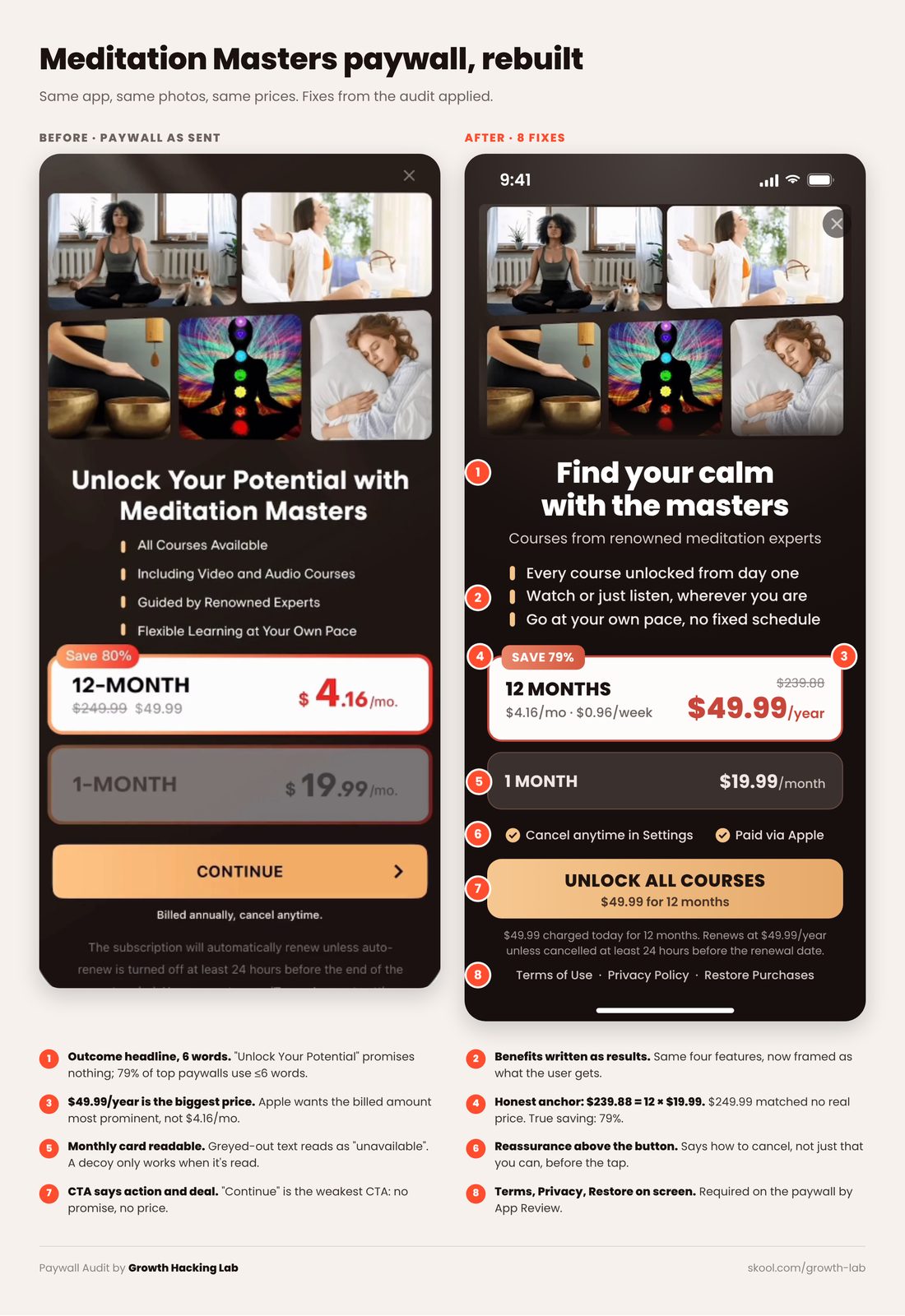
Meditation Masters, run through Paywall Audit. Same app, same photos, same prices. Only the fixes from the audit changed. Tap to see it full size.
What you get
The skill turns Claude into an operator who has spent real ad money on paywalls. It picks a side on every call and never invents a number about your app.
Offer, promise, trust, price clarity, CTA and flow, each scored, with a one-line verdict you can act on.
Trial toggles, hidden billed prices, fake crossed-out anchors, missing Restore or Terms. Flagged before anything else.
Ordered by money impact. Each gap comes with what it costs, the benchmark, and the exact fix in copy.
Offer and plan tests first, copy last. Each with the metric to judge it: trial starts, trial-to-paid or revenue per 1,000 views.
Headline, sub-line, plan card labels, CTA and reassurance line, built from your own onboarding answers when visible.
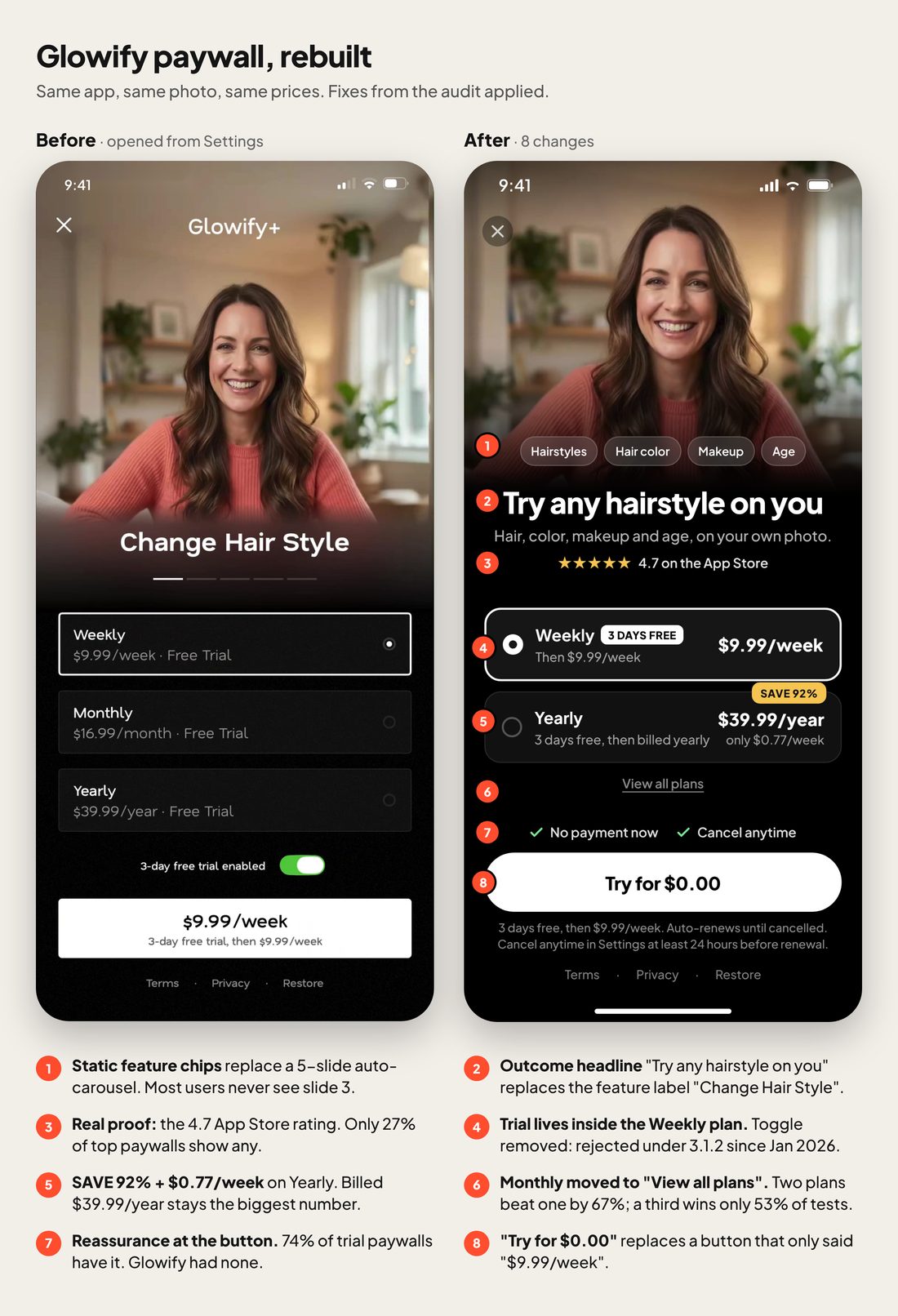
A redesigned paywall image next to your original, using your brand, your imagery and your real prices. Plus an editable HTML file.
What it checks
App Review is subjective, so the skill flags rejection risk before it suggests a single test. Then it checks every element against what the top paywalls actually do.
How it scores
The offer carries the most weight because it moves revenue the most. Compliance risks aren’t scored. They sit above the score until they’re fixed.
Benchmarks built in
Pulled from Adapty’s State of Paywalls 2026, RevenueCat’s State of Subscription Apps 2026, Superwall’s onboarding data and Growth Hacking Lab teardowns. A few of them:
Apps with two plan lengths convert better than apps with one. Adding a third wins only 53% of tests.
Adapty 2026Multi-page onboarding paywalls converted at 12.41% vs 9.07% for single-page, a 37% lift. Only 24% of paywall opens use one.
SuperwallWhen weekly is pre-selected, 90% of buyers stay on weekly. When annual is, only 46% stay on annual. Your default is a cash decision.
Adapty 2026Share of top paywalls that personalize the headline with onboarding data. The biggest open gap on the App Store.
Adapty 2026Install in 2 minutes
Don’t unzip the file. Claude takes the .zip as it is.
claude.ai/customize/skills).paywall-audit.zip.Signed in to Claude Code with the same account? Enabled skills sync there automatically. To install it locally instead, unzip it into ~/.claude/skills/.
Start a new chat, attach your paywall screenshots and ask:
Audit my paywall. Here's the paywall, the last 2 onboarding screens before it, and what shows up after I tap X.Only have the paywall? Send that. The skill does the full audit and tells you which extra screens would sharpen it.
FAQ
Yes. Download the .zip and use it as often as you like. Keep the Growth Hacking Lab credit line if you share an audit it made.
Custom skills work on Claude Free, Pro, Max, Team and Enterprise. Code execution has to be on. On Team and Enterprise, an owner can switch off user-uploaded skills.
No. The skill only needs your screenshots. The benchmarks are written into the skill itself. If Claude can’t render images in your setup, it hands you the rebuilt paywall as an HTML file instead.
No. It’s told never to invent your metrics, prices or text. If part of a screen is cropped, it says “not visible in your screenshot” instead of calling it missing. Ratings only go on the rebuilt paywall if they’re real.
It’s built for iOS. The App Review checks follow Apple’s guidelines. The conversion advice transfers, but the compliance gate won’t match Google Play’s rules.
The paywall itself (every page or scroll frame), the last two onboarding screens before it, and whatever appears after you close it or buy. More context gives a sharper audit.
Free download
One file. Two minutes to install. A full audit and a rebuilt paywall every time you send screenshots.
Want founders who’ve shipped these tests to look at yours? Join Growth Hacking Lab →